 how-to
How to Maintain Instagram Routine While Working
Table of Contents
- Why Maintaining an Instagram Routine While Working Matters
- Instagram Content Batching Tips for Time-Strapped Workers
- Best Instagram Scheduling Tools to Automate Your Posting
- Set Your Instagram Posting Frequency for Consistency Without Burnout
- Create Your 15-Minute Daily Instagram Workflow
- Integrate Instagram Management with Your Work Schedule
- Avoid Common Mistakes When Balancing Instagram and Full-Time Work
- Frequently Asked Questions
Last Updated: August 11, 2026
Why Maintaining an Instagram Routine While Working Matters
Building an income stream on Instagram while juggling a full-time job requires a system, not motivation. The difference between people who earn consistent income from Instagram and those who quit is simple: successful ones have a repeatable process. They schedule time, batch content, and set boundaries.
According to research on sustainable side hustles, people who implement structured workflows are 3x more likely to maintain consistency beyond the first 90 days. Instagram's algorithm rewards consistency above almost everything else. Post sporadically and engagement drops. Post on schedule and the platform actively promotes your content.
The Repost Routine Masterclass teaches a 15-minute daily routine that fits around a full-time job, no face-on-camera requirement, no original content creation. The challenge for most people isn't the strategy, it's maintaining the routine without burning out.
Instagram Content Batching Tips for Time-Strapped Workers
Content batching is the foundation of any sustainable Instagram routine while working full-time. Instead of creating or curating content daily, batch a week's worth in one session. This eliminates decision fatigue and reduces the mental load of constant checking.
Spend 60 minutes on Sunday finding 20-30 pieces of high-performing content relevant to your niche. Save them, caption them, and organize them. Your daily routine becomes execution only.
Identify your content pillars. Focus on 3-4 content themes aligned with your niche. If you're reposting in finance, your pillars might be: investment tips, wealth-building psychology, common financial mistakes, and success stories.
Spend one block session finding content. Dedicate 60-90 minutes weekly to scrolling high-performing accounts in your niche. Look for posts with comments and saves, not just likes, these indicate content that resonates deeply.
Create a swipe file. Save screenshots of content you want to repost. Include the original creator's handle so you can credit them (Instagram's algorithm rewards this).
Write captions in advance. Write 10-15 captions in one sitting. Make them punchy and include a call-to-action that encourages saves or comments. Save these in a document for copy-pasting during your daily workflow.
Organize by posting day. Assign each piece of content to a specific day. Monday content differs from Friday content in terms of audience mindset.
Best Instagram Scheduling Tools to Automate Your Posting
Automation is non-negotiable if you're maintaining Instagram routine while working. Manual posting means logging in at specific times. Scheduling tools post while you're in meetings or sleeping.
Instagram's native scheduling feature (available through Meta Business Suite) is free and reliable. You can schedule up to 75 posts in advance. Third-party scheduling tools add features like multi-platform scheduling, optimal posting time recommendations, and engagement analytics.
When evaluating scheduling tools, prioritize:
- Integration with Instagram's official API
- Optimal posting time suggestions based on your audience
- Bulk scheduling capability
- Analytics showing which posts drive engagement
- Mobile app access
The tool you choose matters less than actually using it consistently.
Set Your Instagram Posting Frequency for Consistency Without Burnout
The sweet spot is 4-5 posts per week. This is enough for Instagram's algorithm to recognize you as active without requiring daily content creation. For someone working full-time, this is sustainable indefinitely.
Posting daily often means lower-quality content and faster burnout. A well-researched, well-captioned post four times weekly outperforms seven mediocre daily posts.
Consistency matters more than frequency. Posting 4 times every single week beats posting 8 times one week and 2 times the next. Instagram's algorithm learns your posting pattern.
Spacing matters. Spread posts across the week, Monday, Wednesday, Friday, and Sunday, to keep your content visible longer and give followers multiple touchpoints.
Create Your 15-Minute Daily Instagram Workflow

Step 1: Set Boundaries with Notifications
Turn off Instagram notifications. Disable like, comment, and story view notifications. Keep only direct messages from close contacts and mentions in captions.
This eliminates the mental interruption that kills deep work. Check notifications on schedule, not on demand. Morning is usually best, 15 minutes after you wake up before work.
Step 2: Time-Block Your Instagram Tasks
Schedule a specific 15-minute block on your calendar. Early morning or evening works best. Your 15-minute block breaks into three parts:
- Minutes 1-5: Check analytics and engagement. Respond to comments if needed.
- Minutes 6-12: Post your scheduled content. Review your caption. Add relevant hashtags or tags.
- Minutes 13-15: Engage with your niche. Like and comment on 5-10 posts from accounts in your space.
Step 3: Execute Your Bare-Minimum Strategy
The bare-minimum strategy is reposting high-performing content with minimal editing. Pull from your batched content, credit the original creator, add your unique angle, include a commission link if monetizing, and post.
The bare-minimum approach works because it removes perfectionism. Good enough, posted consistently, beats perfect posted sporadically.
Integrate Instagram Management with Your Work Schedule
Treating Instagram like a professional task requires clarity on when it happens and when it doesn't.
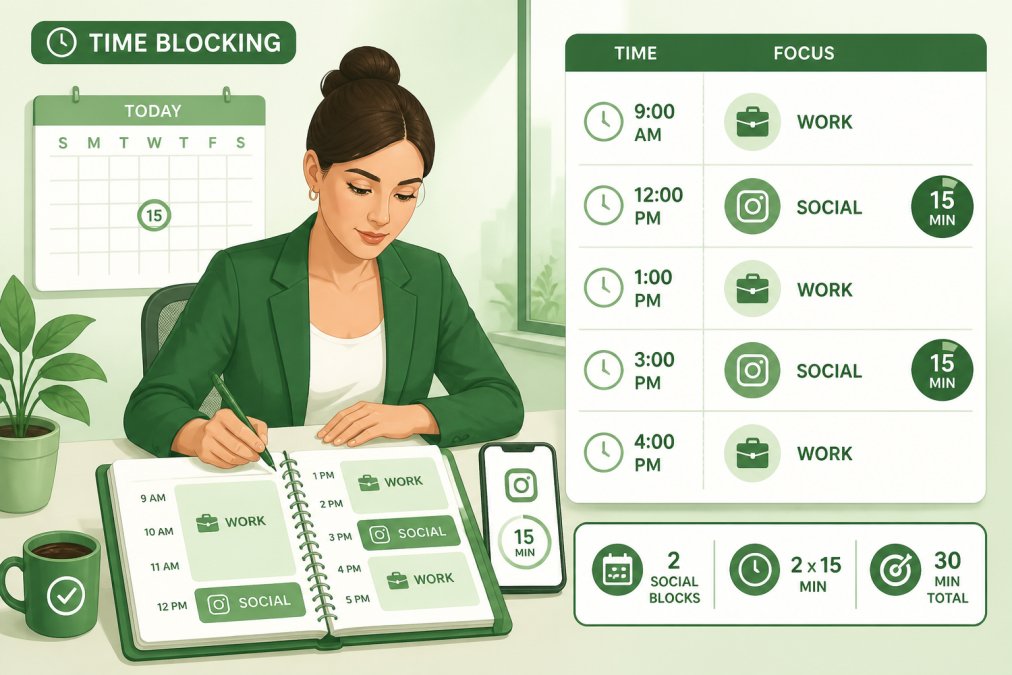
Create hard boundaries. Decide in advance: Instagram happens at 7 AM and 6 PM. Not during work. Not during lunch. Not at 11 PM.
Use your work calendar. Add your 15-minute Instagram block to your actual work calendar. Treat it like a meeting.
Batch your Instagram work with other administrative tasks. If you do email management on Sunday, do Instagram batching then too.
Track your actual time investment. With a structured system, Instagram takes 15 minutes daily plus 60-90 minutes weekly for batching, about 2 hours per week.
Avoid Common Mistakes When Balancing Instagram and Full-Time Work
Mistake 1: Checking Instagram without a specific goal. Set a goal before opening the app. Post and close.
Mistake 2: Waiting for motivation instead of relying on systems. Your 15-minute block happens whether you feel like it or not.
Mistake 3: Treating Instagram as a break from work. This blurs boundaries. Take actual breaks instead.
Mistake 4: Posting inconsistently. Stick to your 4-5 posts weekly even when you don't feel like it.
Mistake 5: Overcomplicating the content. Reposted content with a simple caption outperforms overthought original content.
Mistake 6: Ignoring analytics. Let data drive your strategy, not guessing.
Mistake 7: Expecting results too quickly. Building an engaged audience takes 90-180 days. Stick with the system for at least three months.
Maintaining Instagram routine while working is entirely possible when you stop treating it like a hobby and start treating it like a business process. The Repost Routine Masterclass framework proves this: a 15-minute daily system plus weekly batching generates consistent results without sacrificing your full-time job or mental health.
Start with one week of the 15-minute daily routine. You'll see immediately whether this system works for you. Most people discover that consistency matters more than effort. Post regularly, engage authentically, and let the algorithm do the work.
Frequently Asked Questions
How can I maintain an Instagram routine while working full-time when I'm already exhausted?
The key is working with a bare-minimum strategy, not against your energy levels. A 15-minute daily routine, batching content on weekends and using scheduling tools, means you're not checking Instagram throughout your workday. Set strict notification boundaries and time-block your Instagram tasks to specific windows. Most people find that automating post distribution and batching content actually reduces mental load compared to spontaneous posting, which prevents burnout while maintaining consistency.
What's the best Instagram posting frequency when you're working full-time?
For someone managing Instagram alongside a full-time job, posting 4-5 times per week is sustainable and still builds visibility with the algorithm. This posting frequency is high enough to maintain engagement without requiring daily content creation. Batching content in advance and using scheduling tools makes this frequency achievable in just 15 minutes daily. Start with this baseline and adjust based on your metrics and mental health, consistency matters more than posting every single day.
Will Instagram flag or ban my account if I'm reposting content while working full-time?
Instagram's algorithm doesn't penalize reposting itself; it penalizes spam and inauthentic behavior. The difference is intentionality. If you're batching reposts strategically, crediting sources, and maintaining a sustainable posting frequency aligned with your work schedule, you're operating within Instagram's guidelines. The risk comes from aggressive automation or posting so frequently that it looks bot-like. A thoughtful 15-minute daily routine with proper attribution and reasonable posting frequency keeps you safe.
What's the difference between scheduling tools and batching for maintaining consistency?
Batching is how you create content in bulk (reposting multiple pieces on one day). Scheduling tools are where you distribute those batched posts automatically across the week. Together, they eliminate the need to check Instagram daily. You batch content once or twice weekly, schedule it in advance, and automation handles visibility while you focus on work. This combination is what makes a 15-minute daily routine possible, you're not creating new content every day; you're managing what you've already prepared.
This article was written using GrandRanker